Changing Setup Information for TD0 and TD9 Flash Backup Files |
 |
If you get a .TD0 or .TD9 file from someone else, it will contain their setup info, not yours. Loading their backup into your module will overwrite your setup info which includes trigger settings, user patterns, percussion groups, drum kit chains, audio output routings, etc. To avoid trashing your trigger settings and other setup info, you MUST replace their setup info with a copy from your personal backup BEFORE loading the whole backup into your module.
Follow the steps below to learn how to combine different parts of the setup info (such as trigger banks, user patterns, audio output routings, and percussion groups) from different .TD0 backups. |
|
Step
1: Adding the Setup Info to Your New Library |
|
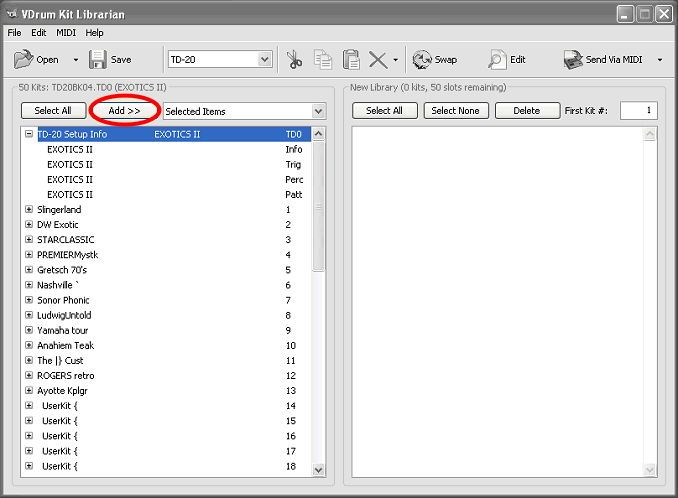
VDrumLib manages the copying of setup info in much the same way that it manages drum kit info. When you open a .TD0 or .TD9 file, the first item in the list will not be a drum kit. Instead, it will be labeled Setup Info, and it will have the TD0 file extension listed in the kit number column. To copy this info, just select it by clicking on it with your mouse, then click the Add button -- just like copying a drum kit. |
|
|
|
Step
2: Copy An Individual Component Of The Setup Info |
|
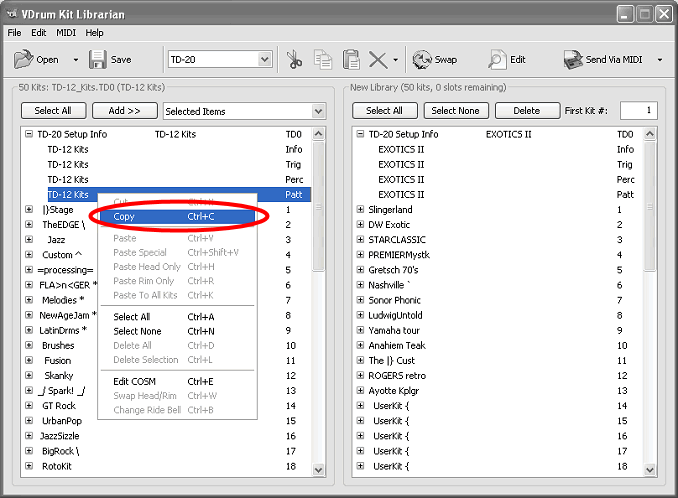
If you expand the setup info folder, you will see the individual components that VDrumLib will allow you to copy. The backup screen name will appear in the name column, while a short mnemonic for the specific component will be displayed in the kit number column. The components vary from module to module, but VDrumLib uses the same mnemonics to identify the components on all modules. The components and their mnemonics are as follows: Global Info (audio outputs, chains, etc,) = Info, Trigger banks = Trig, Percussion Groups = Perc, and User Patterns = Patt. To copy any single component, just select it with your mouse then copy it to the clipboard (ctrl+C). |
|
|
|
Step
3: Paste An Individual Component Of The Setup Info |
|
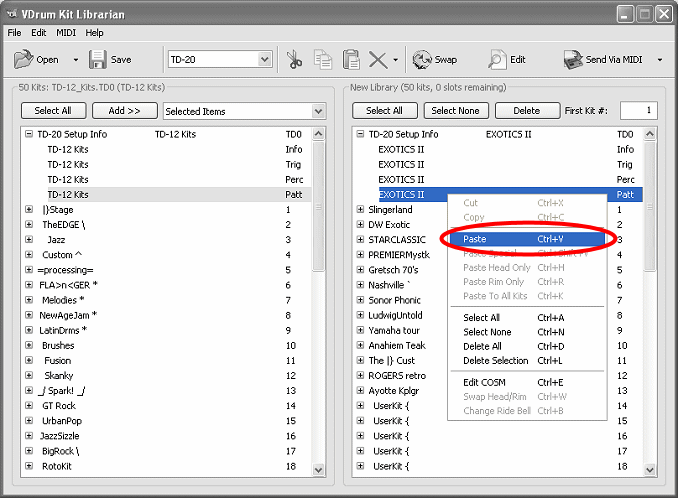
Once you have copied a component from the source listbox on the left, you can paste it over the same component in the setup info of the new library listbox on the right. To paste it, just select the item to be replaced and use the clipboard paste function (ctrl+V). |
|
|
|
Step 4: Viewing The Final Mix Of Setup Info Components |
|
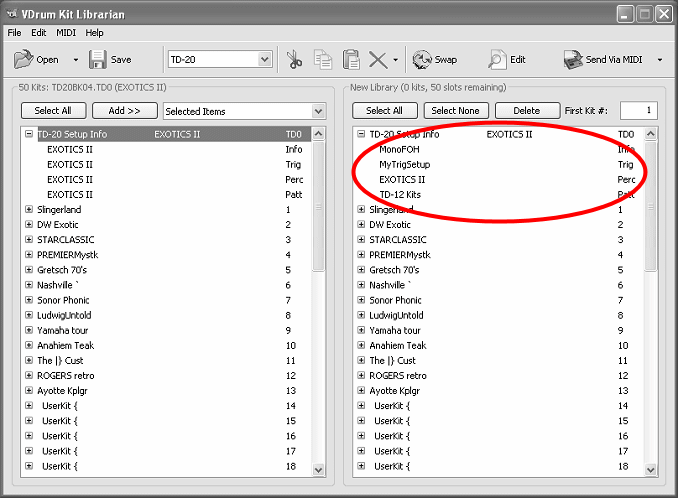
It is not uncommon to mix components from several backups into a new backup. The example below shows audio outputs from a backup called "Mono FOH", trigger banks from a backup called "MyTrigSetup", percussion groups from a backup called "EXOTICS II", and user patterns from yet another backup called "TD-12 Kits." |
|
|
|
Step 5: Changing The Backup Name Displayed On Your TD Module's LCD Display |
|
Now, that you have combined the setup info from your personal backup, it is safe to load the file into your module. The first 12-8 characters of the file name will be embedded into the *.td0/*.td9 so that it will appear on your TD LCD screen when you load it from the flash drive. So, if you use a descriptive name when you save the file from VDrumLib, then the TD LCD name will be the same as the filename that you see on your PC. When you are ready to copy the backup file to your flash drive for transfer to your module, you need to remember to rename the copy on your Flash drive to conform to Roland's file naming format -- don't worry, this will not change the TD LCD display name. |
|
|
|